 EseeCloud Help Center
Wireless Issues
How to configure NVR wireless settings and how to diagnose poor wireless signal between wireless IPCs and the NVR.
Frequently asked questions about NVR wireless settings and troubleshooting weak wireless signals.
Wireless settings
Right-click the mouse → System Settings → Network Settings → Wireless Settings.
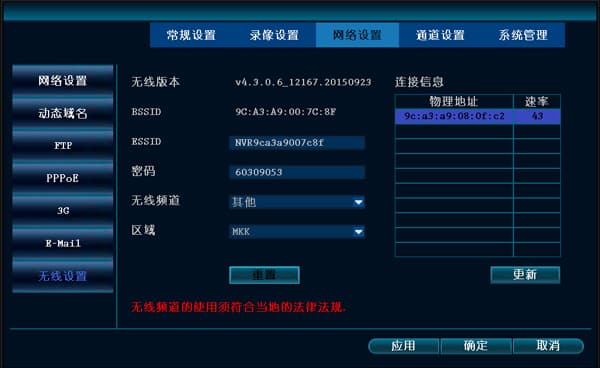
- BSSID: the MAC address of the wireless device.
- ESSID: the NVR's WiFi account name.
- Password: the NVR's WiFi password.
- Wireless channel: the wireless channel used to transmit the signal.
- Region: different regions have their own corresponding wireless channels.
- Reset: restore the ESSID and password from the last matching code.
- Connection info: information about the wireless devices currently connected to the NVR.
- Update: refresh the information of the currently connected wireless devices.
Wireless channel: Other (default).
If there is connection info but the wireless still has problems, you can click "Reset".
A wireless device reports a poor signal — note the distance and whether there are walls in between, then go to System Settings → Network Settings → Wireless Settings
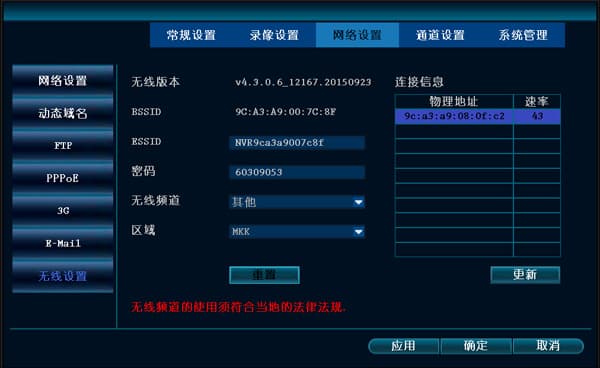
If the IPC is less than 10 meters from the NVR host, you can determine the following:
-
If the MAC address cannot be read, the hardware does not recognize the wireless module.
-
If the first three segments of the MAC address are not 9C:A3:A9, this camera may not be manufactured by us. This type of module can cause unstable wireless connectivity.
-
If the rate is good, reaching 60 or above, but the overall video still stutters, then the environmental interference is relatively strong. You can try switching the channel to confirm.
-
If a certain channel frequently drops and reconnects, and you see a very poor rate here (less than 25), this means the poor signal is the cause.
-
If the rate at close range is below 50 (normally it can reach 70–80), consider an antenna problem. If the rate of all channels is poor, it is an NVR antenna problem; if only a certain channel has a poor signal, it is the IPC antenna problem of that channel.
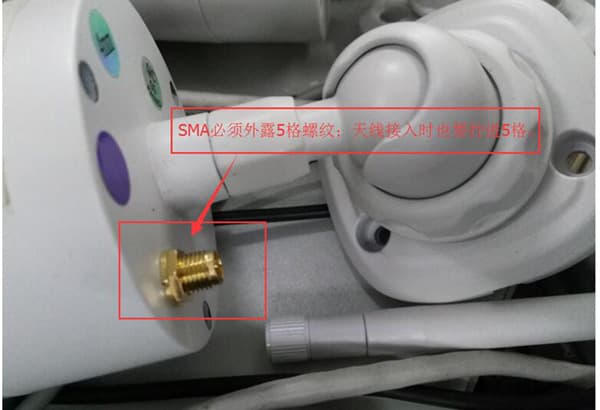
Important note: when installing the antenna, the SMA antenna connector has 5 threads and must be tightened.
Alarm & E-Mail Notifications
How to configure E-Mail alarm notifications on the NVR for motion detection, alarm input, and video loss, plus troubleshooting tips for alarm and wiring issues.
General
General NVR questions covering time sync, startup failures, channel names, factory reset, and hard disk issues.