
LogoEseeCloud Help Center
HomepageDocumentation
Help Center
Functionality
Technical Support
Pre-Sales Issues
FAQs
VR CAM
IPC Router FAQ
Wireless Kit
IPC
NVR
NetworkRemote SetupAudioVideoUser ManagementBasic OperationsRecording & PlaybackBoot Logo SettingsOutput DisplayProtocol IntegrationAlarm & E-Mail NotificationsWireless IssuesGeneral
DVR
Mobile App FAQ
Other FAQs
User Manual
Help CenterFAQsNVR

Output Display

How to fix screen flickering on the NVR's monitor output by adjusting the VGA resolution.

Frequently asked questions about the NVR's display output.

The screen keeps flickering after connecting a monitor to the NVR

  1. The monitor does not support the NVR's current VGA resolution output.

  2. Go to System Settings → General Settings → Screen Settings and change the VGA resolution.
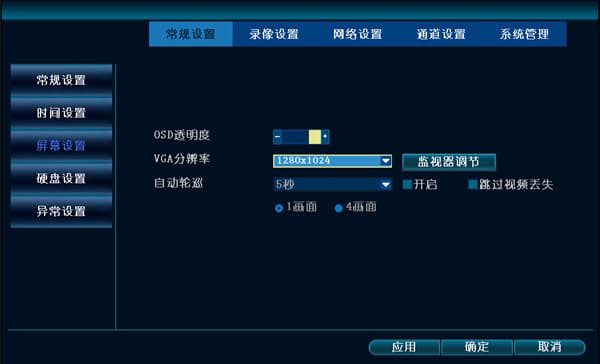
Screen Settings page showing the VGA resolution option

Boot Logo Settings

How to change the NVR boot logo via USB upgrade or remote-control key sequence, and what to check when the boot logo cannot be updated.

Protocol Integration

How to connect third-party IPCs to an NVR via ONVIF and troubleshoot integration issues.

Table of Contents

The screen keeps flickering after connecting a monitor to the NVR